Share this

Showing posts with label Website. Show all posts

Watch Live Webcams Across The World With Geocam.tv

If you want to watch and see situations that happen (live) in other parts of the world via webcam , you can visit GeoCam.tv

This web app allows you to view Google Maps through a number of cameras around the world as shown in image below.

There are 1000+ live webcams are shown in this websites across the world.


Click on the green baloons on that site and you can watch live webcam of that place on your PC as shown in image below.


Link : GeoCam.tv

How To Block apps, Mute users, and Filter tags on Twitter.


Facebook lets you hide annoying posts but you cannot hide tweets on twitter.

But now you can do it with the help of Proxlet, you can hide spam apps, hide some user's tweets and hide tweets having specific #hashtag.

Some Features of Proxlet

  • Block Apps
  • Mute users
  • Filter hashtags
  • Works on the web
  • Works with desktop clients
  • Works with mobile clients
It also supports twitter clients like TweetDeck Desktop, Twitter for iPhone, Twidroyd, Seesmic for Android, Spaz and many more.

Every minute 28.28 tweets are filtered by this application.

Link : Proxlet

FileTram - Best File Search Engine


Filetram is a file search engine, which search files from different sources of files like Rapidshare, Megaupload, Mediafire, 4shared, Hotfile, and lot many more.......

When you search on Filetram, you have option on top left to search only
  1. Audio
  2. Video
  3. Images
  4. Books
You can also search file according to the size of the file.


Link : Filetram

Check the Page Speed of Website with help of Google


With Google Page Speed Labs Online, you can analyze the content of your website.

Enter you websites url and Page Speed Online generate a report with suggestions for improvement.

High priority (Red Points) - These suggestions represent the largest potential performance wins for the least development effort. You should address these items first

Medium priority(Yellow Points) - These suggestions may represent smaller wins or much more work to implement. However, there are no medium priority suggestions for this site.

Low priority(Green Points) - These suggestions represent the smallest wins. You should only be concerned with these items after you’ve handled the higher-priority ones

Link : Google Page Speed

Facebook wants you to make it as your Browser's Homepage


You might have seen this pop-up when opening Facebook on your browser and you might also have added it as your homepage.

Even if Facebook is not our Homepage, most of us open Facebook first.

Share Your Views On Cricket Umpiring


Umpire's Decision has great Impact in Cricket Game. Sometimes our favorite batsman get out due to Umpiring Error. Sometimes this can change the result of match also.

This time ICC introduce UDRS system to review Umpire decision.

Similarly Now you can also Review and comment on Umpire's Decision with BadUmpire.com

Site is very simple.

On Homepage you will find recent decisions by Umpires and when you click on it, you will directed to that page of Umpire Decision,


Here You can click on "Yes" or "No" to review Umpire's Decision and can comment on it also.

Link : www.badumpire.com

bX-f0hw1h Error in Blogger.com solved


Recently Blogger users could not logged in to their Blogger Dashboard

Instead of their dashboard they found error named as bX-f0hw1h as follow:

We're sorry, but we were unable to complete your request.

When reporting this error to Blogger Support or on the Blogger Help Group, please:

Describe what you were doing when you got this error. Provide the following error code and additional information.
bX-f0hw1h
Additional information
host: www.blogger.com
uri: /home

This information will help us to track down your specific problem and fix it! We apologize for the inconvenience.

Find help

See if anyone else is having the same problem: Search the Blogger Help Group for bX-f0hw1h
If you don't get any results for that search, you can start a new topic. Please make sure to mention bX-f0hw1h in your message.


But now this problem is solved and the blogger mentioned this in their twitter that it is working again


(What was in your mind when you found this error? Write it in comment)

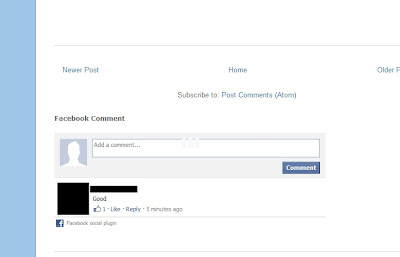
How to Add Facebook Comment Box to Your Blogger Blog


Recently Facebook added new functionality of commenting on Websites with Facebook account. Visitors of Website can add comment on website with their facebook account and this story will posted on his facebook profile with link of that webpage....

You might have seen such comment box on different Websites like MTV India, some tech blogs ,etc....

To Add such comment box to your website/blog, please implement following steps

1. First of all go to Facebook Developers : Comment box

2. Write your blog/Website's URL in box below "URL to comment on" (by default example.com is written over here, change it to your website's URL)

3. Change "Number of Posts" and "Width" according to your requirement

4. Click on "Get Code" and copy that Code

5. Now go to Design---> Page Elements

6. Click on "Add a gadget" and select HTML Javascript

7. Now paste that code here and click save

8. All set.... You will find Comment box on your blog..

(Don't Forget to comment on this page with your Facebook account)

What did people is thinking about famous websites?


Google

- Google is evil (maybe)
- Google is gay
- Google is god
- Google is your friend (correct)
- Google is watching you


Facebook

- Facebook is down
- Facebook is shutting down (rumor which becomes viral few days ago)
- Facebook is evil
- Facebook is stupid
- Facebook is bad


Yahoo

- Yahoo is down
- Yahoo is down today
- Yahoo is not working
- Yahoo is better than Google (may be)
- Yahoo is slow


Twitter

- Twitter is over capacity (everytime)
- Twitter is down
- Twitter is stupid
- Twitter is gay (Google is also gay)
- Twitter is retarded


Wikipedia

- Wikipedia is down
- Wikipedia is not a reliable source
- Wikipedia is wrong
- Wikipedia is reliable
- Wikipedia is bad


Bing

- Bing is not Google (=BING)
- Bing is better than Google (maybe)
- Bing is annoying
- Bing is beautiful
- Bing is down


Orkut

- Orkut is dead (correct, Facebook killed him)
- Orkut is dying (correct)
- Orkut is not opening
- Orkut is blocked
- Orkut is going to end (correct)

Become our Fan at Facebook : Internet Junkie

Join our Orkut community : Internet Junkie

Play Chess with players from different countries in world


Lichess is a great chess playing website, which is available in different languages,. This website allows you to participate in real challenges of chess online. Lichess have a really clean interface and you can play so it with mobile devices like iPhone and iPad.

You can play chess with the computer or can invite friends to play or play with anonymous random chess players from any country in the world. It is possible to establish time limits of individual moves and choose the color of chess. Lichess is free and no registration required.

You can check this site at : Lichess

How to Check Website Safety ?

Today in this Internet Age, daily millions of link are shared on Social Networks and Different services are given by different websites. Internet is very useful thing, but it also have virus,spywares,trojans,etc. Sometimes we feel insecure in visiting some sites. There are many web based services which will check safety of given website's URL. here are some examples

URLVoid

just type an internet address (URL) into the field, click the Scan Now button and, within seconds, a report on the site comes back.


AVG Safe Search

if you are using AVG Internet Security, you might be aware of AVG Safe Search add-on for Firefox. This add-on will give security status of given website and small icon indicating website security will be shown in search results of Search Engine.


McAfee SiteAdvisor

Another online service to check url safety is Mcafee siteadvisor. You can check website safety by writing website URL in visitor site report as shown in Figure below


WOT - Web Of Trust


Norton Safe Web

Another site that performs a similar function is Norton Safe Web.


URL is entered here


This is Norton Threat Report for Internet Junkie


Please join us at Facebook and Orkut.

What will be size of Encyclopedia , if it is made from Wikipedia.org ?


Recently Wikipedia completed 10 years, giving us free Information about all everything serving as online Encyclopedia.

Do you ever thought that If Encyclopedia is made from Wikipedia site, What will be its Size?


Lets Check the number of pages of that Book

- Today Wikipedia has information of over 1.74 billion words in database.

- A word document page holds approx. 500 words (single spaced).

- So divide 1.74 billion by 500 words you get 3.48 million pages....

- If you make a book out of computer/ printer paper then the book would be 1370078.740 inches==21.6 miles thick and 8.5" x 11" in length and height.
(that's very very big)

Free Online File Convertion


In this age of internet, we always need a good file converter because sometimes files we find on internet are not in our required format and we have to convert that file as we can't find that stuff in different formats.

Thats why people use different software to convert files like video converters, audio converters and image converters


the another solution to this problem is Online file conversion tool.

Zamzar.com

  • It can convert any file within 100 MB size
  • It will send a converted file to your mail
  • If you want to convert bigger file than 100 MB, you have to make account on this site (which is not free)

Keyboard Shortcuts for Facebook

  • Alt+1 Home Page
  • Alt+2 Your Profile
  • Alt+3 Pending Friend Requests
  • Alt+4 Inbox (messages)
  • Alt+5 Notifications
  • Alt+6 My Account
  • Alt+7 Privacy Settings
  • Alt+8 Facebook Fan Page
  • Alt+9 Terms and Conditions Page
  • Alt+0 Help Center
Become Fan of our Facebook Page at Internet Junkie on Facebook.

Top 10 Websites of 2010

1. Google : Enables users to search the Web, Usenet, and images. Features include PageRank, caching and translation of results, and an option to find similar pages. The company's focus is developing search technology.

2. Facebook : A social utility that connects people, to keep up with friends, upload photos, share links and videos.

3. Youtube : YouTube is a way to get your videos to the people who matter to you. Upload, tag and share your videos worldwide

4. Yahoo! : Personalized content and search options. Chatrooms, free e-mail, clubs, and pager.

5. Windows Live : Search engine from Microsoft.

6. Baidu : The leading Chinese language search engine, provides "simple and reliable" search experience, strong in Chinese language and multi-media content including MP3 music and movies, the first to offer WAP and PDA-based mobile search in China.

7. Blogger : Free, automated weblog publishing tool that sends updates to a site via FTP.

8. Wikipedia : A free encyclopedia built collaboratively using wiki software. (Creative Commons Attribution-ShareAlike License).

9. QQ.com : China's largest portal, providing instant messaging, news and information, online games and online auction business

10. Twitter : Social networking and microblogging service utilising instant messaging, SMS or a web interface.


Search the most shared content on Facebook

People are sharing lots of different links on facebook everyday. It is possible to see trending topics on twitter on twiiter's page. Now you can also see what links people are sharing on facebook with the help of this wonderful website.


It shows you most shared links of different topics like:
  • Videos
  • Humor
  • Images
  • Music
  • Gossip
  • Social
  • TV
  • Education
  • News
  • Politics
  • Finance
  • Tech
  • Sports
  • Gaming
  • Shopping
  • Cooking
All Things Now website is updated frequently.

You can also search for a link on this site.

(if you like this article, please click on facebook like button given above)